HP 9500mfphp Manual de usuario Pagina 237
- Pagina / 354
- Tabla de contenidos
- SOLUCIÓN DE PROBLEMAS
- MARCADORES

- HP Color LaserJet 9500mfp 3
- Copyright and License 4
- 4 Chapter – 6
- Printing 10
- Selecting and using media 11
- Control panel menus 11
- Managing and maintaining 12
- Problem solving 12
- Service and support 13
- 12 Contents 14
- 14 Contents 16
- MFP basics 17
- Control panel 20
- Control-panel home screen 24
- Setting the MFP defaults 25
- Loading input trays 26
- To load media in tray 1 27
- K to change the 28
- APER HANDLING 29
- RAY 1 SIZE 29
- RAY 1 TYPE 29
- XIT to exit the menus 30
- Loading tray 2 and tray 3 31
- XIT to accept the settings 32
- K. The TRAY N 32
- ILLIMETERS.) 39
- K to exit the menus 43
- (tray 4) 44
- RAY X TYPE 45
- XIT to exit the menu 45
- 30 Chapter 1 – MFP basics 46
- Copy-screen layout 48
- Copying instructions 51
- “Z” ordering 56
- “N” ordering 56
- Copying by using the ADF 58
- Copying books 59
- Reduce or enlarge 61
- Adjust the lightness/darkness 61
- Enhance the document 61
- Background Removal 62
- Sharpness 62
- Setting copy defaults 63
- Digital sending and e-mail 65
- Sending documents 67
- Changing the settings 68
- END OPTIONS 69
- Using the address book 71
- Creating a recipient list 72
- Country/region support 73
- Verifying the fax operation 77
- • Date and time 78
- • Location (country/region) 78
- Fax option 79
- AX SETUP REQUIRED 80
- ATE/TIME 80
- OMPANY NAME 82
- Fax feature screen 83
- Sending faxes 84
- EXT NUMBER 86
- PEED DIAL 87
- HONE BOOK 88
- Canceling a fax 89
- Speed dial 90
- To delete a speed dial 91
- AX option 92
- ETTINGS 92
- AX SETTINGS option 92
- Receiving faxes 94
- Setting the modem volume 96
- Setting the ringer volume 97
- AX SEND 98
- EFAULT RESOLUTION 98
- Setting a dialing prefix 99
- To set redial-on-busy 100
- Setting the paper tray 101
- Setting the destination bin 102
- Troubleshooting fax 103
- Checking fax status 105
- Fax feature is not operating 107
- General fax problems 109
- Receiving fax problems 112
- Sending fax problems 116
- Error codes 119
- Fax product specifications 123
- TYPE=ANY TYPE 126
- Private jobs 128
- Stored jobs 129
- To print a stored job 130
- To delete a stored job 130
- QuickCopy jobs 131
- To delete a QuickCopy job 132
- Proof and hold jobs 133
- To print a proof and hold job 134
- 120 Chapter 5 – Printing 136
- Rev. 1.0 136
- XIT to close the menu 138
- Retrieve job menu 139
- Information menu 141
- Paper handling menu 143
- Configure device menu 147
- Copying submenu 150
- TART without selecting the 151
- Enhancement submenu 153
- Sending submenu 154
- E-mail submenu 155
- Printing submenu 157
- Print quality submenu 163
- System setup submenu 166
- ONTINUE is touched 172
- Using non-HP-brand media 176
- Ordering supported media 176
- Setting media size and type 177
- Standard media size 178
- Custom media size 179
- Supported types of media 180
- Recommended media 181
- Determining media type 187
- • standard sizes: 189
- • 64 to 220 g/m 189
- • custom sizes (face up): 192
- • 64 to 200 g/m 192
- • 64 to 135 g/m 195
- • 64 to 216 g/m 195
- Ordering supplies 204
- Storing supplies 205
- Storing the image drums 206
- Print cartridges 207
- Using the image drums 212
- Replacing the image drums 213
- Image transfer kit 218
- K. The kit life 228
- ENU button to open the 228
- ES to reset the count 228
- Image cleaning kit 229
- K. The kit life count is 234
- ENU button. Use the Up 234
- Image fuser kit 235
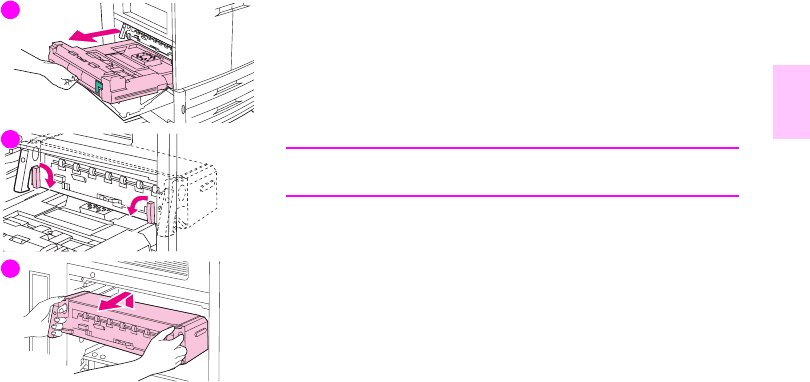
- Replacing the image fuser kit 236
- K. The kit life-count is 239
- Cleaning procedures 240
- the MFP 243
- 5 Close the ADF cover 244
- Cleaning the post charger 247
- Cleaning procedures 233 249
- Cleaning the fuser input 250
- Relocating the MFP 253
- Jam clearing locations 256
- Jam in tray 1 258
- Jam in tray 2 or tray 3 260
- Clearing jams 249 265
- Clearing jams 257 273
- Jam inside the duplexer 274
- Jam in the top output bin 280
- Solving repeated jams 291
- Understanding MFP messages 293
- If a message persists 294
- Output-quality-defect chart 298
- Smeared toner 301
- Misaligned colors 303
- Procedure 304
- Page description 304
- Thumbnail views of test pages 304
- ENU button 305
- IAGNOSTICS 305
- ROUBLESHOOTING 305
- Solving MFP problems 306
- Media-handling issues 309
- TART to send it 311
- MFP-output issues 314
- Duplexer issues 319
- Warranty information 307 323
- HP software license terms 324
- Information from the MFP 326
- World Wide Web 327
- Physical specifications 329
- Power consumption 333
- Acoustical specifications¹ 335
- Protecting the environment 337
- FCC statement 342
- Regulatory statements 343
- Canadian DOC Regulations 346
- VCCI Statement (Japan) 347
- Korean EMI Statement 348
- Laser Statement for Finland 348
- Taiwan Class A Statement 350
- Taiwan Battery Statement 351
- Product Information Sheet 351
- *C8549-90902* 354
Relacionado con productos y manuales para Multifuncionales HP 9500mfphp
 (3 paginas)
(8 paginas)
(202 paginas)
(116 paginas)
(163 paginas)
(145 paginas)
(184 paginas)
(96 paginas)
(16 paginas)
(292 paginas)
(2 paginas)
(142 paginas)
(331 paginas)
(2 paginas)
(48 paginas)
(3 paginas)
(8 paginas)
(202 paginas)
(116 paginas)
(163 paginas)
(145 paginas)
(184 paginas)
(96 paginas)
(16 paginas)
(292 paginas)
(2 paginas)
(142 paginas)
(331 paginas)
(2 paginas)
(48 paginas)
© 2020, manymanuals.es. Todos los derechos reservados | 0.033 s |
 Manymanuals.com
 Manymanuals.de
 Manymanuals.fr
 Manymanuals.it
 Manymanuals.pl
 Manymanuals.cz
 Manymanuals.es
 Manymanuals-pt.com
Comentarios a estos manuales